NetSuite Advanced Financials in Action
A controller's-eye demo of automated amortization schedules, headcount-based expense allocations, and flexible customer billing.
About this episode
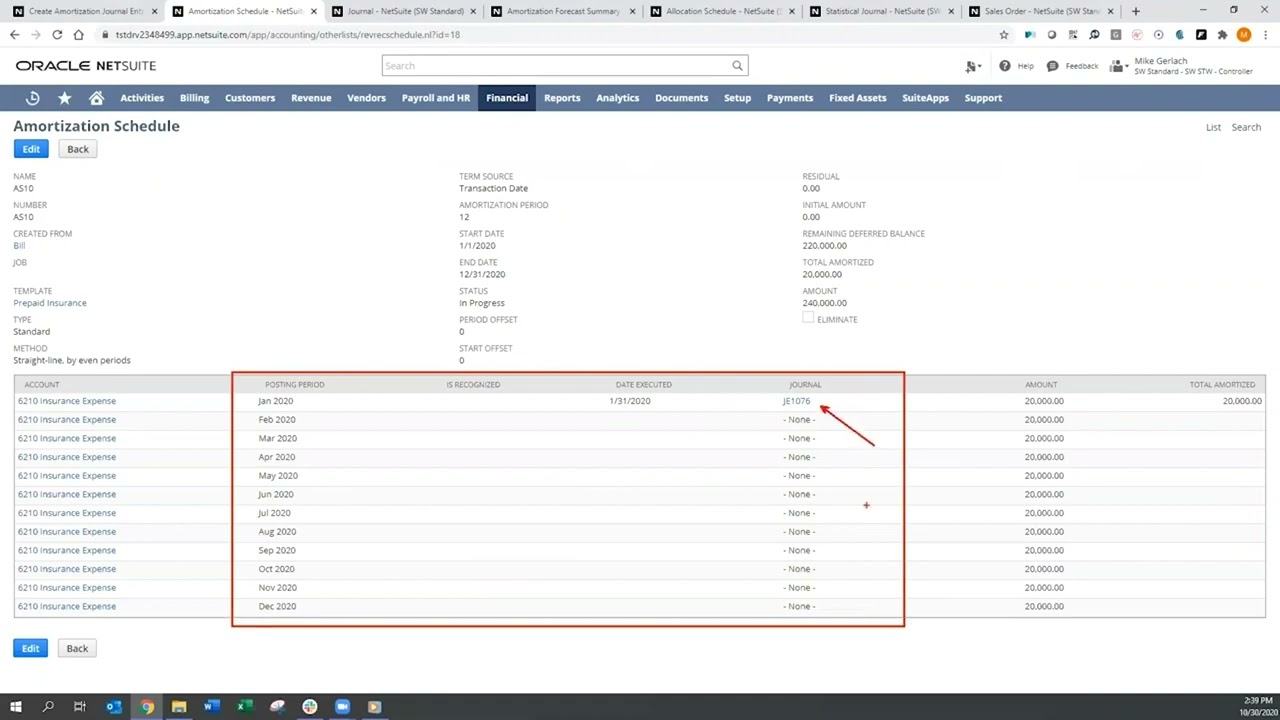
One vendor bill carries much of this screen recording: $240,000 in prepaid annual benefits that NetSuite reclassifies and expenses over twelve months through an attached amortization schedule, with drill-downs into the monthly journal entry and a roll-forward forecast report.
The same expense is then spread across departments using headcount as the statistical allocation basis. A closing look at billing schedules shows one sales order mixing an annual subscription billed up front, a monthly support contract, and professional services billed in two installments, all compiled into a single billing forecast report, viewed throughout from a controller login.
Talk to a NetSuite consultant
Questions about what you just watched? A 30-minute call with our team gets you straight answers on your own setup.
Book a call00:00foreign netsuite Advanced Financial Management in this video I'm going to demonstrate amortization expense allocation and more flexible customer billing I'm currently logged into netsuite as the controller there are a number of proactive reminders on my dashboard including tasks to be performed such as an imposition entry that is waiting to be approved clicking on this reminder and opening up this vendor bill I can see we will be prepaying our annual benefits in this case the 240 thousand dollars will be amortized over 12 months from January to December one attached to an amortization schedule yes we will automatically reclassify benefits expense to a prepaid expense account clicking on the attached amortization schedule allows me to drill down into specific details I can see prepaids are due to be expensed on a monthly basis notice
01:02we've already expensed the month of January drilling down even further by clicking on the link to journal entry we see the monthly entry reducing the prepaid expense and posting against the benefits expense the amortization forecast report displays a roll forward and summary of all of our amortized expenses in addition to amortizing our various prepaid expenses over the course of the year we might also need to distribute these expenses across our different internal departments we can use netsuite's Dynamic allocation functionality to do this based on different statistical measures for example head count by a department we are able to enter statistical amounts into netsuite this entry shows the head count assigned to the individual Department which will be the basis for the benefit allocation going back to the netsuite allocation schedule I can see
01:53we will be allocating the benefits expense across the various departments based on the headcount we just reviewed and the related calculated allocation weights netsuite's Advanced Financial Management also enables enhanced billing functionality navigating to a recently open sales order we can see that with netsuite billing schedules you can determine the frequency with which your customers will be billed in the amount of each bill for example on this sales order we have an annual subscription billed 100 up front an Associated support contract builds monthly and Professional Services build on a contracted basis moving to the billing Tab and selecting schedule you can see the schedule for items to be billed thirty six thousand dollars for the subscription 750 a month for the support contract and the Professional Services and two installments of twelve thousand dollars each finally with the building order forecast report
02:52we see a report that compiles all the billing schedules in a single report thank you for watching this demonstration if you have any questions please reach out to your account manager