Mass Delete NetSuite Records Fast
Turn on inline edit in a saved search, shift-click a range, hit delete. Permissions and dependent records decide what actually clears.
About this episode
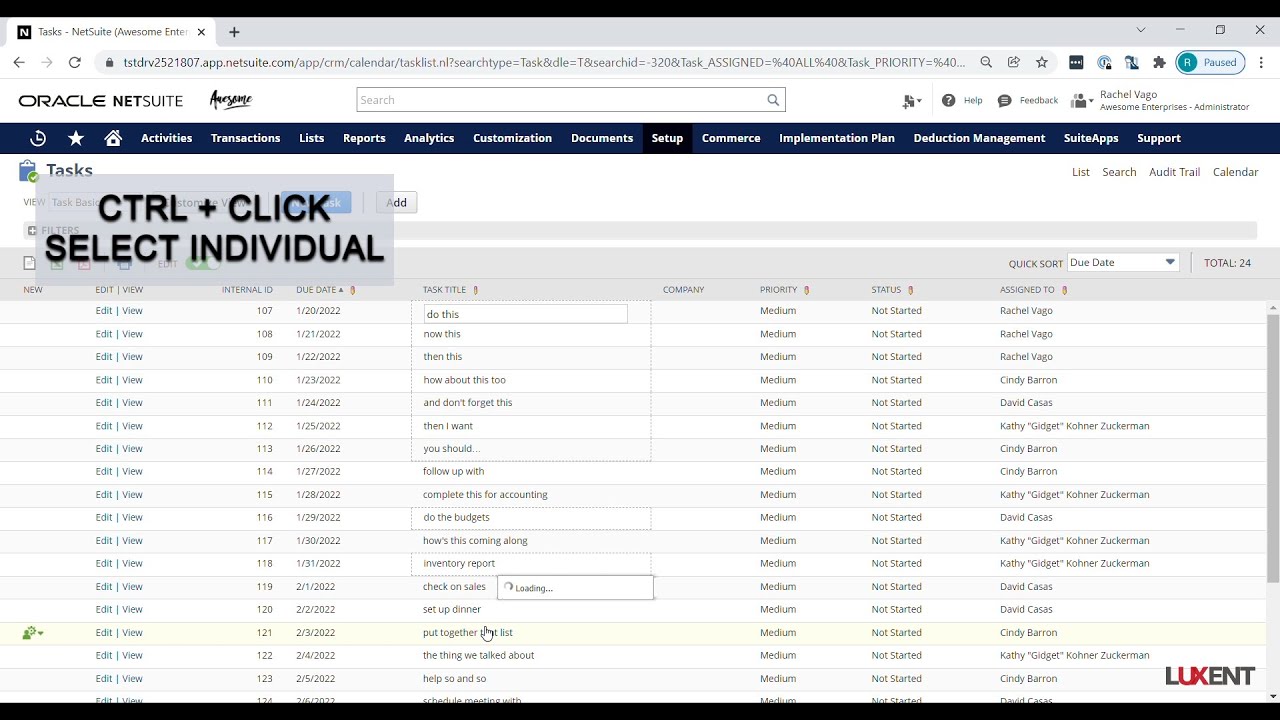
The whole trick is inline edit: switch it on in a saved search or list view, shift-click a range (or control-click scattered rows), then hit the delete key, or even the spacebar, and confirm the warning.
Rachel Vago demos it on a task list and spends the back half on what stops it from working: your role needs full permissions on the record type, and anything with dependent records, like a fulfilled sales order, won't delete. Bigger transactions clear slowly enough that you may need a browser refresh to see them go.
Talk to a NetSuite consultant
Questions about what you just watched? A 30-minute call with our team gets you straight answers on your own setup.
Book a call00:00[Music] hey everyone welcome back for another sweet tip tuesday for this week's tip we are going to go through a simple method to mass delete records using inline edit of a saved search so because we're mass deleting a bunch of records we do want to be careful but because we're using a saved search or a list view because it's based off of a saved search we can get our criteria super specific to be what we need so here i am starting with my task list for this i just went straight to my activities scheduling and tasks so i did not create a very specific saved search but we can so here i have all of my tasks i'm going to go ahead and turn on inline edit so once our page refreshes we'll see the little pencils across the top so if you did create a saved search from scratch you will need to make sure that you have at least one field that shows a pencil on it a lot of times memo is a very safe field or any custom field
01:17and then so once we have our list view we'll go ahead and pick the records that we want to delete if we're picking records in a row we can choose the first one hold our shift key on our keyboard and select one a little bit further down and then if we don't want contiguous records we can hold our control key and choose some that are just one by one and then once we have our record selected you'll see these little dotted lines showing so once you have these ready you can hover over what i like to call the little green guy and choose delete record or you can simply hit your delete key on your keyboard you'll get a little pop-up notification that just warns you that all these records are going to be deleted so go ahead and click ok and then when it refreshes you'll see that those tasks are gone for some of the bigger transaction types it might take a little bit longer for the system to
02:23actually delete it so you might look at your list and think oh man why is that still there but you can go ahead and click your refresh on your browser and as you do it you'll see that these numbers start to dwindle the other thing to note is that we can only delete things this way if we can delete them manually in the ui so we do need to have permissions for it if we're not in an admin role our role needs full permissions to that record type and then the record can't have any dependent records so if you're trying to delete a fulfilled sales order you won't be able to do it or an item that you created that somebody else put on a purchase order you wouldn't be able to delete that one either so uh once we've got a list view of our data and it's pretty clean like deletable um we'll be able to do this exercise so again you know just go ahead and select one shift click the rest hit your delete key you'll get your warning another little keyboard shortcut you could just plain hit your spacebar
03:28and then it'll refresh and you'll see them being deleted so again just want to warn you be careful with this but hopefully when you do need it it will come in handy you know of course i like to say hopefully you don't need it but in all likelihood there will be times so hope you have a great week and join join me next week for another sweet tip bye guys [Music]