Smarter NetSuite Quoting with iQ CPQ
How manufacturers quote engineer-to-order and configurable products in NetSuite without pre-building items or BOMs. A walkthrough of iQ CPQ.
About this episode
The running example is a configurable golf cart, and it carries the product's central claim: reps can quote engineer-to-order builds without anyone pre-creating items or BOMs in NetSuite.
Senior iQ engineer Hunter Barnett builds a quote live, filtering to a product through guided full search, configuring an option-set bike, importing quote lines from a spreadsheet, and assembling a custom golf cart with a multi-level bill of materials, then checks profitability with the margin calculator and clones the whole quote. The send-to-NetSuite step shows the integration creating customers, items, BOMs, revisions, and routings only where they don't already exist. Q&A covers transaction types beyond sales orders, custom field mapping, and the fact that sales reps don't need a NetSuite seat; subscriptions start around $50 per user with a 45-day quick-start implementation program.
Talk to a NetSuite consultant
Questions about what you just watched? A 30-minute call with our team gets you straight answers on your own setup.
Book a call00:05Welcome everyone. Thank you so much for joining us today. We are talking about all things iQ CPQ. So, smarter quoting in NetSuite for manufacturing teams. As a quick little introduction, I wanted to just share a little bit about what we're going to be presenting today. So, we're going to do a quick introduction to Luxent. um a little bit about iQ CPQ, what the features and products, you know, features and and different things that it has as well as a live demonstration from Hunter and then we'll open it up for questions and answers.
00:35So, we'll answer all those questions that you might have at the end. There is a Q&A panel at the bottom of your screen here. So, if you do have any questions, please put them in there and we will do our best to answer as many of them as we can on this call today. So, quick introduction to myself and to Hunter. Um, I'd like to first introduce Hunter. He's a senior IQ engineer here at Luxent. And he has been in the cons consulting world for a little over five years working on all things CRM and ERP, specifically within NetSuite and Salesforce.
01:07So, Hunter has lots of experience working with manu manufacturing teams improving their coding process with iQ CPQ. And I'm Brooke Gyepes, the marketing director here at Luxent, and I work closely with a lot of growing companies as they grow and scale on NetSuite. So with that, I'd like to give you a little bit of an introduction to who Luxent is. So before we really jump into the good stuff, I want to give you a quick background on Luxent. You know, Luxent has been helping companies implement, grow, and scale on NetSuite for the past 16 years, and we're a premier NetSuite solution partner, award-winning, um, and a certified sweet cloud development partner.
01:45So, we cover kind of the full life cycle of all things NetSuite from the selection, implementation, integration, custom development, and ongoing support. So, full service. Our consultants on average average more than 10 years of experience. and we focus on companies and many different spaces such as manufacturing, distribution, software, um, and many others. So, I want to kind of get right into it. Now that you guys know a little bit more about Luxent, I'm going to tell you a little bit more about IQ.
02:18Okay. So, why iQ CPQ? I'm sure you're all here to find out. All right. Well, IQ is built for kind of complex manufacturing quoting. I know I I I saw a lot of you guys that have registered for here today, you know, working kind of in the manufacturing space. And unlike other CPQ tools, IQ lets your reps quote custom builds kind of on the fly. So there is no pre-built items, no bombs required up front, which is a huge huge kind of win when you're dealing with configurable products. So IQ is really flexible and scalable.
02:47You can quote products, services, bundles, add-ons all in one place without jumping between multiple different systems. And it's really easy to implement and maintain. So that's like a really key feature for for everyone to kind of note here. Your team can make changes and updates to it kind of inhouse after everything's implemented. So you're not really stuck relying on us um every time something changes or should I say Hunter in some cases. Um IQ is really global ready so it supports multicurrency, multicountry and customer specific pricing.
03:20So kind of as you grow into new markets IQ can grow with you. And finally, IQ just makes your team faster. So, because of how easy it is, it requires less manual entry, allows for fewer errors, and it really streamlines approval processes. So, your reps can get quotes out the door quicker in front of customers a lot quicker and gives your customers just a a better kind of customer experience. Okay. Well, Hunter, I'm going to pass it over to you to walk through kind of what the key features are in IQ.
03:52>> All right. Great. Thank you, bro. No problem. >> All right. So, we're going to start here with our product configurator. So, from the configurator standpoint, uh our product configurator is super easy to configure. It's userfriendly, easy to administer. Um it will generate smart codes, you know, based on your selections. It will um manage the dependencies so that your users only select the items that are available based on the configuration. Uh we also have our guided selling. So that's our full search that has the attribute filtering.
04:25Um and we have related products. So these related products help you upsell, cross-ell, um find alternate products or add maintenance planes. Um we also have multiple product types. So we have configured products. So these are the ones that are engineered to order. We also have our standard products. So these would be like your inventory items, um kits and bundles. So kit products and assemblies and then we have completely custom products that you can just make on the fly. Uh we also support engineer to order.
05:00Um so these have the bill of materials. So you can add multi-level bill materials. So these would be the sub assemblies and um other component items. Uh they support labor cost and additional outside cost. And then we also have real-time validation in IQ. So, if you have an incremental quantity or a minimum quantity, when you add that product, uh if you select a quantity that isn't compatible, you'll see the warnings. So, those are the orange images there. Uh and it'll also update it uh to be in compliance.
05:37Okay. So, we do have pricing rules. So, builtin is our pricing rules engine. Um you can define the rules basically on any criteria. Um that could be customer specific pricing. It could be promotional pricing. Uh it can support discounts, adding new products, adding charges such as shipping. Uh you can also set these rules rules based on the customer, the product that's selected or even information that's on the quote itself. Um we have customer and customer group specific pricing. So you can assign you know price list to the customers.
06:12Uh we have tiered and quantity uh based pricing. We also support reoccurring and subscription pricing. Uh we have multiple pricing options. So you can set a defined list priced. Uh you can do cost markup. You can also set a target margin or you can do multiplier based pricing. Uh we also have a margin health indicator. So in the images there you see the green and yellow dots. uh that lets you know if you're within your target margin there. We also have a margin calculator that can update the pricing based on the target margin that you want so that you ensure you get the correct profit from the item.
06:54You also have uh multiple units of measure. So we support each cases, pallets or custom units of measure that may be specific to you. Uh we have multicurrency support and we also have sales tax integrations. So we can work with Avalara tax jar or any other you know tax uh service. So when quoting you can import quote lines. So this is useful if you get like a uh a spreadsheet with the products from your suppliers. We also support enhanced cloning.
07:30So if you have a quote that is similar or a customer comes back and wants to reorder the same products, you can clone that. Uh we have quote groups which are for organizing the products on the PDF render. Uh you have optional products. So these are products that can be added to the quote um but won't be in the totals. So it will show up as a recommended product to the client. Uh we also have a template builder that supports multiple images and we have e signature integrations. So we've worked with DocuSign, adobe sign, sign now um and we also have other template builders we can work with and our NetSuite integration.
08:14Uh outside of just NetSuite, we do work with other ERPs as well. So the standard NetSuite integration is this here, but it is super flexible. So if you have, you know, custom items that you want to integrate with, we can work with that as well. Um, so we start with the entity level. So that's your customers and contacts. Uh, we only create those if they're needed. So if they've already been synced to NetSuite, we won't recreate them or duplicate them. Uh, same with items. We'll create any new items that you configure.
08:48uh as well as the components and the bill of materials, any revisions. Um that could be the manufacturing, routing, locations, anything you need there, uh we can support. And then finally, we send the transaction and that will include any attachments if you want them. So we can send the PDFs, the drawings or you know, anything else you may have attached. >> Awesome. Okay. Well, I think it's time for us to really get into the nitty-gritty and take a look at the actual product. So, Hunter, I'm going to stop sharing so that you can take the screen here.
09:24I'm going to turn off my camera as well so it's easier to easier to share. >> All right. So, let me share my screen here and then let me know when you can see it. >> All set. >> Okay, great. So, we're going to start from the opportunity in NetSuite. Um, you can also start from within IQ. So, if you don't want to have your sales users in NetSuite, you don't have to. So, I'm going to click on this create IQ quote button and it will start the process there. Okay.
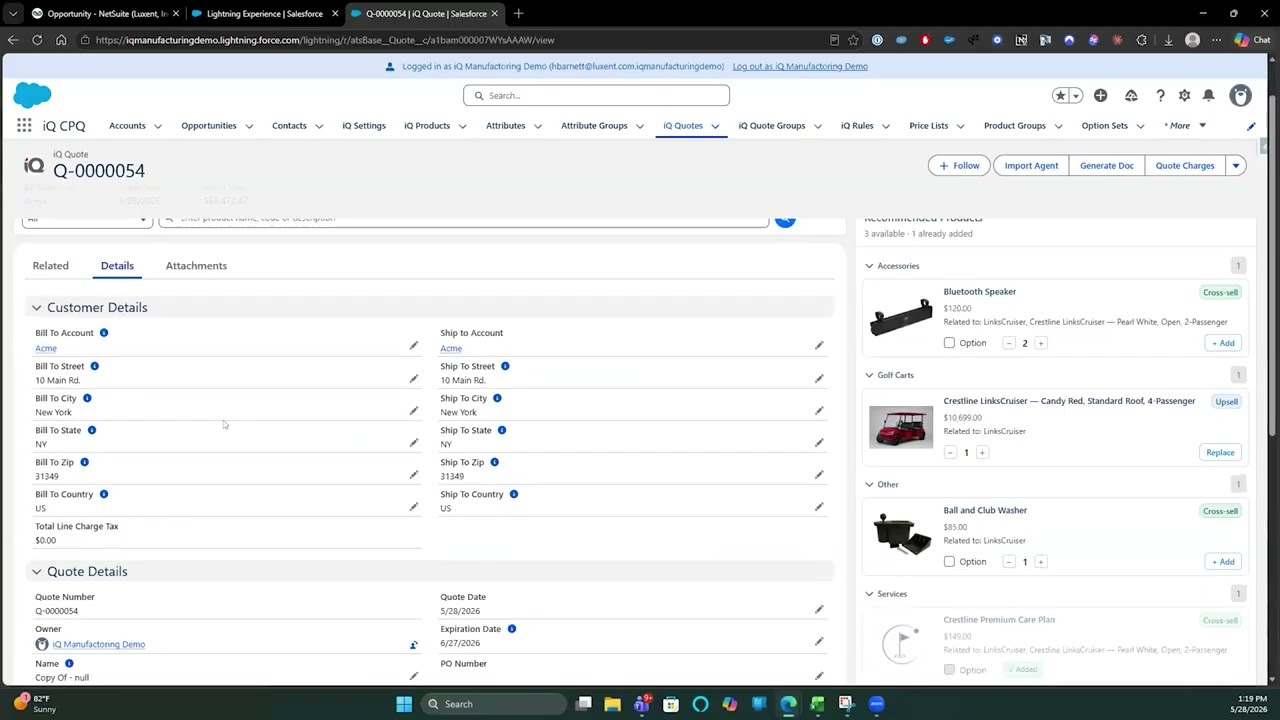
10:12So, I'm going to start with our full search. So, this is our full search here. Um, this is great if you want to narrow down the product. Um, so you might not know the product code or name that you're looking for. Um, so for this I want to find a golf cart that is blue and has an enclosed roof. So once I make these selections, you'll see that there's just one item to add. So I'm going to go ahead and add that to my quote. Here you can see it's been added with the banner there. And if we look at the quote, it is there as well.
10:42So that is our full search. We also have a quick search. So if you know the product code or product name that you're looking for, you can just go ahead and paste that in. And so I'm going to use this product code, but like I said, you can also use the product name or description. So you see here it added the product from the quick search. You may have also noticed an additional product was added here. So, this is an optional product or a related product. Um, you'll see that it's marked optional here.
11:16So, this is useful for teams that need to cross-ell or upsell. Um, you can inline edit from here. So, if you need to change the quantity or if you wanted to add a discount, you can do that as well. So, I'm going to make those changes here. Okay. And then you'll also notice the recommendations panel. So if we wanted to cross-ell this Bluetooth speaker, I could add it to the quote by simply clicking the add button here. So moving on, uh we have our option set products.
11:56So for this one, I'm going to add a bike here. So the city go option. So, option set products are like miniature configurated products. Um, so you'll notice it's real easy to know when it's an option set. There'll be yellow boxes here that allow you to make selections. So, I want a large bike and I want it to be blue. So, now that I've made my selections, you can see the product code has been updated as well as the quote line description.
12:31So, it's a large blue and I can save my products there. We also support importing custom products. So we have this import agent here and we have on another screen I have an Excel file with some product information. So I'm just going to paste that in here. And you can see I can map it. So if I needed to make a change I could select from the list. But for now this is going to work. So I'm importing these lines. And so now you can see these products were added to the end of the quote lines.
13:11We also support our configured products or the engineer to order products. So I'm going to add one of those here and we'll walk through that together. So, as I add this, it's going to open up the configurator. And this is where it's going to allow me to make my selections. So, let's say I wanted a white one with an enclosed top. I'll make my selections. And as I make these, you'll notice that the smart code is being updated. So now that I've made my selections, you can see in our configurator panel here, you can see the bill of materials is being built out as well as an operation is being added.
14:05Um, if we were to add accessories, it would add the quote line and you'll notice that here. So, it added this product. I'm actually going to remove that for now. Um, and then we also have our variables panel. So, um, not only can it make the smart code, it can also dynamically create the product name. Um, and in our configurator, you can do other uh other things as well. So, product code, product name. So, once I've made my selections, I can save and exit. And you'll see that this also gets added to the quote.
14:44And then if we wanted to look at the bill of materials, we can go in and check the details and click manufacturing details. So you'll see here this is the bill of materials that was generated. Um the operations were added and additional cost. Um if we wanted to add an additional cost, we can do that here. We can also add more operations and we can also add more materials or components. We can also add completely custom products. Um, so if we wanted to do that, we would just click on the add custom product button.
15:26And so we can do kits, but for now I'm going to create this as if it were an assembly. So I'm going to call this engineer to order golf cart. And I'm going to give it a description here. We're going to add this product. And so now we can work on the bill of materials. So we're going to go to manufacturing details and we're going to add.
16:05So, we know if it's a golf cart, we're going to need a frame. I'm going to add that here. Uh, we may also want to add a wheels wheel set. We can also add the multi-level um sub assemblies here. So if I wanted to add that I could do it manually. So we'll call this sub assembly going to do one and then we can add to this here.
16:47So, let's add a um you can add the Bluetooth speaker and we can even go further on than that if needed. Um we do have a margin calculator as we mentioned in the presentation here. So, if you click into that, you can see we have a target margin set at 50, but we can update this percentage and see what the target price should be um and update the price straight from here. So, that is how you add all the products to the quote.
17:31Um, we also have the ability to add charges to our quote. So, if we wanted to add a shipping charge, we could do that as well from here. Uh, and we also have our cloning. So, um, if you have a quote that's very similar, you can use the cloning feature. Uh, or if they want to reorder the same products, you they can. You can include the lines. So, if you wanted to bring over all of these lines onto the new quote, you can. And then you can make your changes there to those. You can also update pricing.
18:03So, if it's been a while and the prices have changed, you can select this option. If you had a shipping charge or any other charge, you can include those as well. Um, so once you've cloned the quote, you can go into your lines, make the adjustments there. Uh, you can also change the customer and any details on the quote. Okay, so that is how we create it in IQ. Um, we do have the integration. So you can do this a couple ways. In this org, we have it set up on a button. So you can click the send to NetSuite button and it will start that integration.
18:40Um it'll create the customers and contacts if needed. It will create any new items or item components. Um just to show you an example here and save us some time, I created a very similar quote and we'll go look at this here in NetSuite. Okay. So this is the quote in NetSuite. You can see the items are added. You can click into these items here and look at the manufacturer routings and bill of materials.
19:22So let me open up that assembly here. And you can see the bill of materials and the revisions are created. You can click into those and view them as well. Okay.
20:01Um, so that concludes the demonstration portion of the demo. Uh, if you'd like to dive deeper into any of the configuration or NetSuite integration, I'd be more than happy to meet with you and go into that in more detail. >> Awesome. Thank you so much, Hunter. That was super great. And um, it's really fun to see IQ in action here. Okay, let's jump right back into it. So I just wanted to talk a little bit about pricing and implementation, what that kind of looks like so everyone has kind of a full clear picture of what IQ might look like in your organization.
20:36So NetSuite IQ subscriptions start at about $50 per user and we can go live in as little as 45 days with Luxon's um IQ quick start implementation program. So we work with lots of of manufacturing teams in the NetSuite space and we have a full kind of quick start package to help teams get ready and implemented and started on their IQ journey. So after this call today there will be a survey that pops up. So if you would like to schedule that 30 minute discovery session you can select that in the survey and we can get that set up for you.
21:16Okay. So, now we're going to open it up for some questions and answers. If there are any questions, please put them in the chat in the Q&A chat. Okay, I see some coming through here. Okay, Hunter, here's the first question. Um, does IQ only create service orders or does it do cash sales or other transaction types? >> Yeah, so it doesn't have to do just sales orders or service orders. It can do basically any transaction that you want. So, we've done opportunities, quotes, estimates, um, you know, orders, invoices, cash sales, all of them.
21:58>> Oh, okay. Very cool. So, hopefully that answered that question there. Um, another question here. Can you add custom NetSuite fields? >> Yes. So, with our integration, um, of course there's going to be some mapping done, but we can add any just about any field that you would need, um, to send NetSuite or even just to have on the quote to fill out. >> Okay, good. Good. All right, last question it looks like has come through here. Um, and this is an interesting question. So, do our te our sales reps need a NetSuite license to access and create a quote?
22:37>> No, they don't. So, as long as they have access to IQ, uh, they can do all of their work in there and then send it over to NetSuite. Um, and then if you want them to see any of the downstream transactions, um, we can bring those back into IQ as well. >> Okay, perfect. Oh, one last question that just came through here. Can you report on the data from NetSuite? >> Yeah. Um, so there's a couple different ways you can do reporting in NetSuite, uh, as you normally do, or you can have IQ reporting.
23:07So if you wanted to do some forecasting or any kind of reporting like that, you can as well. Um, and then if you have users that are not in NetSuite, you know, like I mentioned, we can do that downstream transactions and pull them back into IQ and then they can do the reporting there as well. >> Awesome. Okay. Well, it looks like those were most of our questions for today. So, I'm going to kind of wrap us up here. All right. Well, first off, thank you everyone for attending our demonstration today.
23:39These are kind of like our next steps. So, congratulations. You've already completed step one, which is attend one of our Luxent iQ CPQ demos. So, I hope that you guys got a lot of information out of how IQ can help streamline your quoting process for your company. Step two is to schedule a 30-minute discovery and we can send over some budgetary pricing after we complete that discovery. So again, after the after the webinar ends here today in just a couple minutes, there will be a survey that pops up and you can select for us to reach out and schedule that 30 minute um 30-minut demonstration.
24:10So let us know if you'd like for us to meet with you and we can get started. And then step three, buy iQ CPQ and get started on your team quoting faster and more efficient and selling more. All right. Well, thank you everyone for joining us today. We hope that um you were able to get a lot of good information about IQ and we look forward to talking with you soon. Have a great day.